The Ultimate Discord Gaming Companion
Automate 100% free game alerts, broadcast verified deals across 35+ storefronts, sync your Steam wishlist, check PC requirements, and view HowLongToBeat completion times in chat.

Everything Your Gaming Community Needs
Equip your Discord server with enterprise-grade game price tracking, automated feeds, and real-time gamer utility.
100% Free Game Alerts
Automatically broadcasts weekly Epic Games freebies, Steam 100% off promos, GOG giveaways, and Prime Gaming loot with automated role pings.
Deals Across 35+ Stores
Aggregates prices from Steam, Epic, GOG, Fanatical, Humble, GreenManGaming, Xbox, PlayStation, and Nintendo Switch with historical low tracking.
Steam Wishlist Sync
Sync your public Steam wishlist directly with GameHub. The bot delivers private DMs the instant any game drops in price or enters Game Pass.
PC Hardware Specs Checker
Run /canirun to look up Minimum and Recommended CPU, GPU, RAM, VRAM, and storage requirements before buying or downloading.
HowLongToBeat Times
Instant crowdsourced completion benchmarks for Main Story, Main + Extras, and 100% Completionist runs with progress meters straight from HowLongToBeat.
Co-op Game Matchmaker
Cross-reference two Steam accounts with /compare to find shared multiplayer titles, or run /pick to decide what your group plays tonight.
See GameHub in Action
Designed for Discord power users and community admins. Clean embeds, zero clutter, and instantaneous responses.
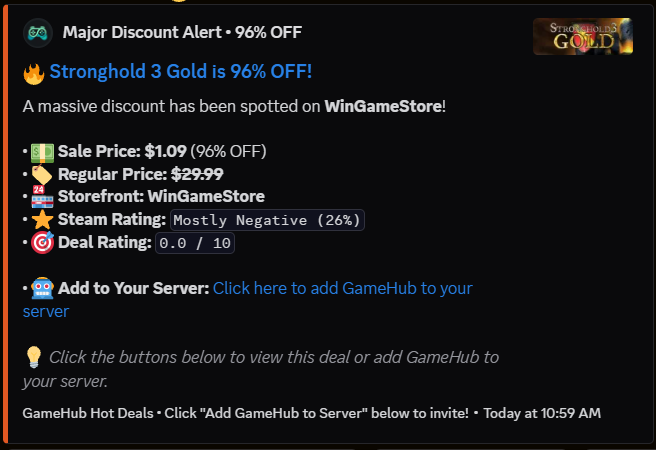
Multi-Storefront Major Deal Broadcasts
Set up automated broadcasts in your server using /set-deals-channel. Filter by custom discount percentages (≥ 50%, 75%) or specific storefronts like Steam, Epic, WinGameStore, or GOG.
- Automated rotation across 500+ active discounts
- Displays Sale Price, Regular Price, Savings %, and Steam Review Score
- One-click store checkout buttons and anti-duplicate rotation
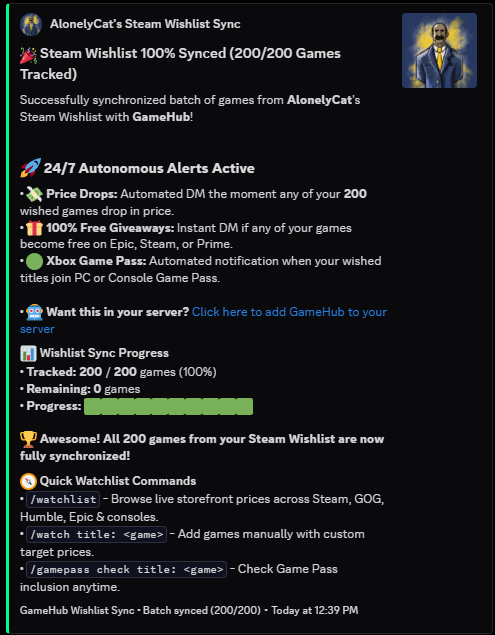
24/7 Autonomous Steam Wishlist Sync
Synchronize your public Steam Wishlist into GameHub with /syncwishlist. Track your favorite titles and receive private, automated DM alerts the second discounts or free promotions trigger.
- Automated DM price drop alerts the moment any of your tracked games go on sale
- Instant DM alerts if any of your wished games become 100% free on Epic, Steam, or Prime
- Automated notification when your wished titles join PC or Console Xbox Game Pass
- Fast interactive batches: import your games with live progress tracking and automated alerts
Co-Op Library Matcher & Shared Games
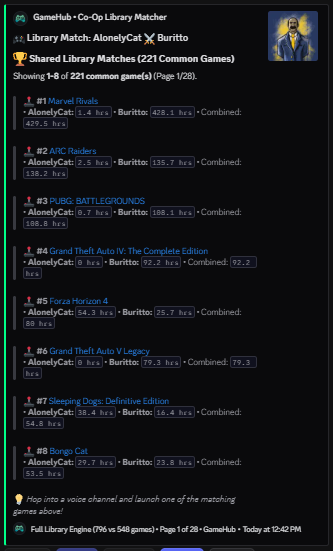
Never ask "What games do we both own?" in voice chat again. Run /compare to cross-reference two Steam libraries across hundreds of games in seconds, complete with mutual playtime rankings.
- Cross-references entire owned libraries (700+ titles) to reveal all shared co-op & multiplayer games
- Ranks games by combined playtime so your squad immediately spots mutual favorites
- Displays individual playtime hours, total combined time, and interactive page buttons
- Works instantly with Steam vanity URLs, SteamID64s, and user handles
Instant Gamer ID Cards & Friend Codes
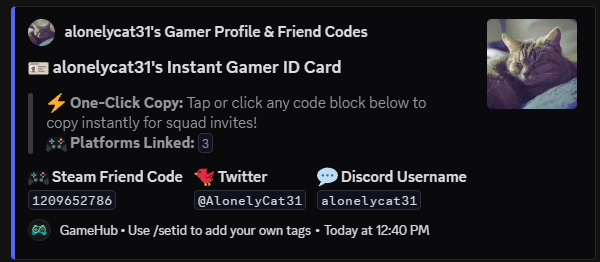
Stop digging through settings to find your friend codes. Use /id to generate a sleek, interactive gamer card featuring your Steam Friend Code, Discord tag, and social handles with instant one-click copy.
- One-Click Copy blocks: teammates tap any code block to instantly copy for squad invites
- Supports Steam Friend Codes, Twitter/X handles, Discord usernames, and custom platform tags
- Set up your tags once using /setid and share them anywhere across your servers
- Clean embeds with custom avatar artwork and connected platform counter
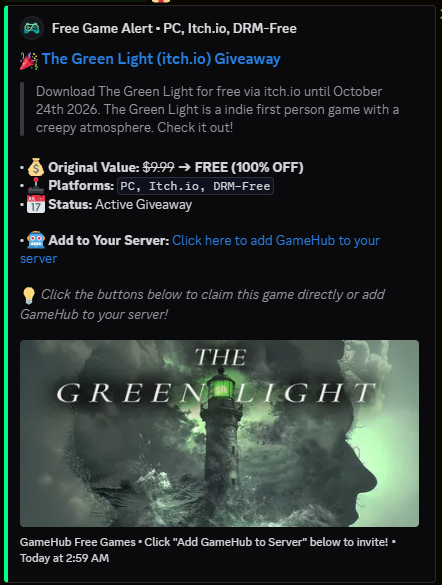
Instant 100% Free Game Giveaways
Never let your community miss a freebie. When Epic Games, Steam, GOG, or Itch.io drop limited-time 100% off promotions, GameHub broadcasts them instantly with full banner artwork.
- Role pings ensure members claim before the giveaway expires
- Displays Original Value, Platform tags (PC, DRM-Free), and Claim deadlines
- Clean HD game art embeds directly in Discord chat
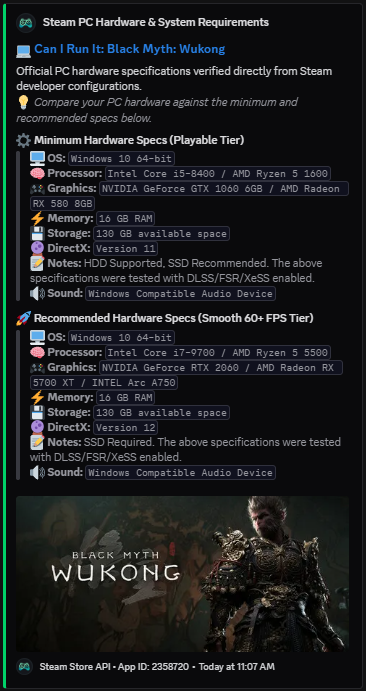
PC Hardware Requirements Checker
Stop opening web browsers to check if your rig can handle a title. Run /canirun Black Myth: Wukong for a verified breakdown of playable vs. smooth 60+ FPS hardware tiers.
- Minimum Hardware Specs (Playable Tier)
- Recommended Hardware Specs (Smooth 60+ FPS Tier)
- Verified CPU, GPU, RAM, VRAM, SSD storage, and DirectX version
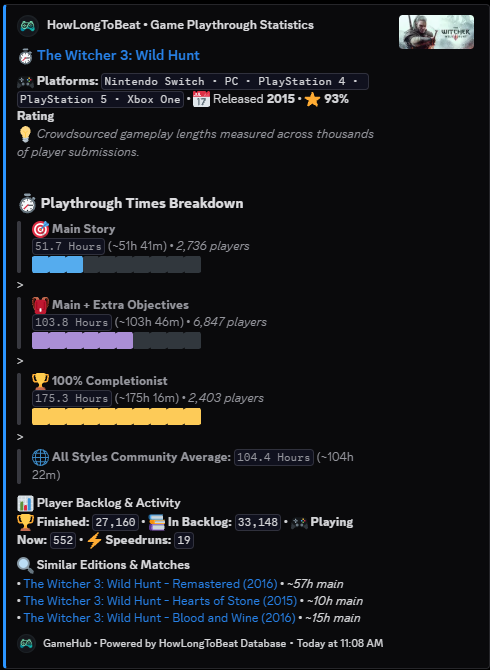
HowLongToBeat Progress Breakdown
Discover whether a game is a quick weekend play or an 80-hour epic. Direct integration with HowLongToBeat provides crowdsourced playtime metrics and backlog counts.
- Main Story, Main + Extras, and 100% Completionist runs with progress meters
- Community Player Backlog, Finished, Playing Now, and Speedrun counts
- Includes expansions and edition comparisons (e.g. Hearts of Stone, Blood and Wine)
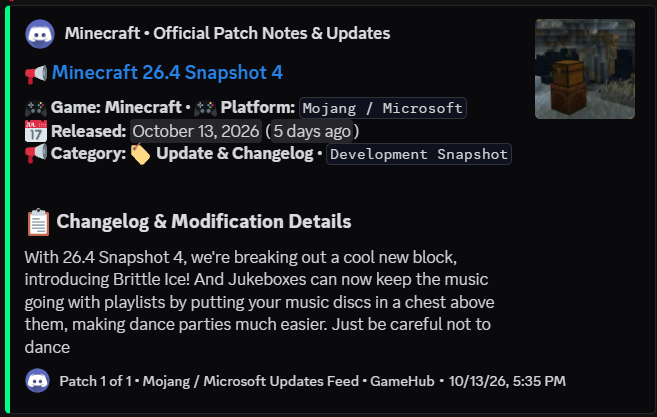
Official Game Patch Notes & Updates
Keep your gaming server up to date with automated changelog feeds using /set-patchnotes-channel. Follow updates for Minecraft, VALORANT, Apex Legends, and more.
- Automated delivery of development snapshots, updates, and major releases
- Clean formatting with changelog bullet points, platform tags, and release dates
- Dedicated role pings for gaming sub-communities
All 53 Slash Commands
Click any command to copy its syntax directly to your clipboard.
List all active 100% free games on Epic Games, Steam, GOG, and other digital stores.
Search active discounts and real-time store pricing across 35+ PC and console storefronts.
Check games currently 100% free to download and play this weekend on Steam with launch links.
Check the all-time lowest price a game has ever hit in digital storefront history.
All-in-One Buyer Decision Matrix: price history, reviews, hours per dollar, and specs.
DLC Cost & Essential Pack Analysis: total DLC cost vs base game and expansion breakdown.
Track active digital bundles from Humble, Fanatical, and subscription additions.
Explore the Xbox Game Pass catalog: check inclusion, recent additions, and games leaving soon.
View Epic Games weekly freebies, countdown timer to the next drop, and upcoming sneak peeks.
Search Nintendo Switch eShop prices, active sales, discounts, and regional digital pricing.
Set your preferred display currency (USD, EUR, GBP, CAD, AUD, INR, BRL, JPY) for pricing.
Sync your public Steam wishlist directly to receive automated sale, freebie, and Game Pass DMs.
Add a specific video game to your personal price drop watchlist for automated direct messages.
View, inspect, and manage all video games currently monitored on your price alerts list.
Remove a video game from your personal price drop notification watchlist.
Bulk remove multiple games from your watchlist via visual multi-select menu or search filter.
Remove all games from your price drop watchlist at once with interactive confirmation.
Deep game directory with Metacritic scores, Steam user reviews, developer, and storefronts.
Check Minimum & Recommended PC hardware requirements (CPU, GPU, RAM, Storage, VRAM).
PC Port Health & DRM Radar: flags Anti-Cheat (EAC, BattlEye), Denuvo, Ultrawide, FOV, and Deck tier.
HowLongToBeat breakdown for Main Story, Main + Extras, and 100% Completionist runs.
Check official Steam Deck compatibility (Verified, Playable, Unsupported) and controller notes.
Check crossplay compatibility matrix across PC, Xbox, PlayStation, Switch, and cross-progression.
Official changelogs and bug fixes for Steam and non-Steam games (Minecraft, Valorant, Fortnite).
Live concurrent in-game players right now, 24-hour peak, all-time record, and SteamDB stats.
Live server gaming pulse, active presence leaderboard, peak hours guide, and Steam Charts.
Community review breakdown, 30-day sentiment trend, Metascore, and top helpful player impressions.
Essential mod radar & workshop showcase: Bug Fixes, QoL, Graphics Overhauls, and direct links.
Video game soundtrack explorer and radio: album tracklists, composer credits, Spotify/Apple Music.
Esports configs: mouse DPI, in-game sens, crosshair codes, resolution, and hardware gear.
Live speedrun world records, top verified runner leaderboards, and video VODs from Speedrun.com.
Steam completion progress, rarest trophies, easiest missing achievements, and secret trophy guide.
Interactive gaming calendar of major industry events, reveals, tournaments, and seasonal sales.
Browse upcoming highly-anticipated video game releases, launch windows, and pre-orders.
Compare two Steam accounts to see all games and multiplayer titles owned in common.
Pick a random unplayed game from your Steam library based on review score and playtime length.
Discover top-rated 100% Free-to-Play games for squad game night (Shooters, Battle Royale, Survival).
Interactive Community Game Tier List Maker with live voting board (S, A, B, C, D tiers) rendered in chat.
Video game trivia quiz challenge with interactive buttons, 20s timer, difficulty tiers, and XP rewards.
Screenshot mystery puzzle and progressive clues: guess the mystery title in 5 attempts before reveal.
Server backlog challenge bounties: post tough goals, claim challenges, submit victory proof, and earn XP.
Server gaming leaderboard: track top rankings for Bounties, Trivia, Mystery Solvers, or Combined XP.
Squad Game Night Decider & Party Randomizer: settles group indecision by rolling a tailored co-op game.
Squad Clip of the Week: submit video highlights, upvote clutches, and view the weekly podium.
Designate an announcement channel for 100% free game giveaways with automated role pings.
Broadcast high-value deals with custom storefronts, discount thresholds (≥ 50%, 75%), and timer intervals.
Automate patch notes and update announcements for games like Minecraft, VALORANT, Apex, and more.
GamerConnect hub: view copyable gamer IDs, friend codes, and game tags for yourself or a squadmate.
Link or update your personal Steam Friend Code, Discord tag, or platform tags in individual or bulk slots.
Remove a saved platform from your gamer card, or clear all saved tags.
Inspect Steam profiles, account badges, VAC ban status, account level, and SteamDB calculator links.
Live gaming server outage detector for Steam, PSN, Xbox Live, Epic Games, Riot, Nintendo, and Blizzard.
Check live bot statistics including active servers, total users served, support server members, and uptime.
Get official bot invite links to add GameHub to your Discord servers, plus the support hub link.
Interactive help manual with category dropdowns, option guides, and quick-start tutorials.
Live in Your Server in 60 Seconds
No clunky web dashboards or complex permission setup. Configure everything directly inside Discord.
Add GameHub to Server
Click the invite link and select your Discord server. GameHub requests standard slash command and channel send permissions.
Choose Announcement Channels
Run /set-free-channel #freebies and /set-deals-channel #hot-deals in the channels you want automated alerts.
You're All Set!
GameHub takes over 24/7. When deals or free games drop, your members are immediately notified with clean embeds and direct links.
Frequently Asked Questions
Everything you need to know about GameHub's pricing, features, and technology.